


Yatzy GO! Classic Dice Game
4.92.47K Reviews
App Specs
- Version
- 3.5.9
- Updated On
- License
- Free
- Downloads
- 500,000+
- Developer
- Game In Life
- Categories
- Board
- Platform
- Android
Screenshots


 Analysis by AppCompare
If you’re anything like me, you’re always on the hunt for a game that’s not only fun but also a bit challenging. Enter Yatzy GO! Classic Dice Game. This app brings the classic dice game to your fingertips, and trust me, it’s worth a roll.
A familiar game with room for decisions
Yatzy works well on a phone because its appeal is easy to understand: luck sets the possibilities, but each turn asks you to decide what to keep and which scoring opportunity to pursue. That balance makes it more engaging than a dice roller, while still being light enough to pick up without setting aside a whole evening. I see this as a useful choice when I want a game with a little thought in it, but not a complicated rulebook or a long campaign to remember.
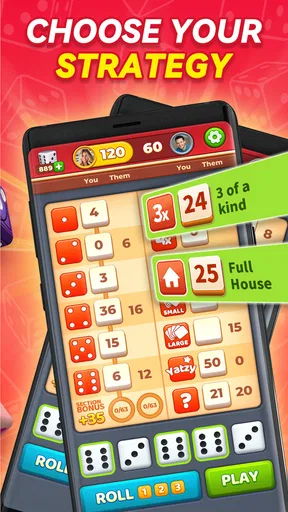
The important distinction is that strategy here is about managing the hand you have, not controlling the dice. A sensible approach is to check the scorecard before committing to a category, then consider whether the current roll gives you a realistic chance at a stronger result or whether it is safer to bank points elsewhere. New players can focus on learning what each category rewards; experienced players can think about the cost of filling a weak line now rather than leaving it open. That small decision-making loop is what gives repeat rounds their texture.
What a typical session feels like
For me, this kind of game fits naturally into the gaps in a day. Imagine waiting for a friend at a café: I can play a round while keeping one eye on the time, then put the phone away without losing track of a sprawling story. It also suits a quiet break at home when I want something interactive but don’t feel like starting a competitive action game. Because the central activity is turn-based, there is less pressure to react instantly than in many popular mobile games.
That convenience has a trade-off. A quick round can become several if I start chasing a better result or following a competition, so I wouldn’t open it when I need to focus on a task that cannot be interrupted. The format is easy to pause mentally, but the urge to finish a game can still stretch a short break. I find it helps to decide before starting whether I have time for one round or a longer session.
Who will enjoy it, and who may not
I’d recommend it to people who already enjoy Yahtzee-style dice games, casual board games, or low-pressure score chasing. It is also a reasonable starting point for someone who has never played: the basic idea is approachable, and the original article’s tutorial makes the learning curve less intimidating. If you like comparing choices with friends, the social and competitive elements may give you a reason to return beyond simply rolling dice alone.
It is less suited to anyone looking for a deep strategy game where skill consistently outweighs randomness. You can make thoughtful choices, but no plan guarantees a particular roll, and a run of poor luck can make a round feel frustrating. Players who prefer narrative progression, fast reflexes, or a completely quiet single-player experience may be happier with a different kind of game. The social features described below are a plus for some, not a requirement for enjoying the core dice play.
Worth Reading Before You Choose

Baby Panda World Brings Quick Play to Modern Phones, but Its Game Library Feels Busy

ESPN’s Live Game View Makes Following Close Games Easier

QuizzLand Review: A Good Fit for Short Trivia Breaks, Not Every Player

Basketball Stars: Multiplayer Is Fast, but Can It Recover When Matches Go Wrong?

WEBTOON Turns Phone Updates Into a Better Reading Routine

Link to Windows Runs on Shared Habits, Not Social Feeds
Rolling the Dice: First Impressions
When I first opened Yatzy GO!, I was instantly drawn to its sleek and user-friendly interface. It’s got this minimalist vibe, which makes it super easy to navigate. No fuss, no muss—just straight-up dice action. The game loads quickly, and I didn’t experience any annoying lags or glitches, which is always a plus in my book.
Gameplay Galore
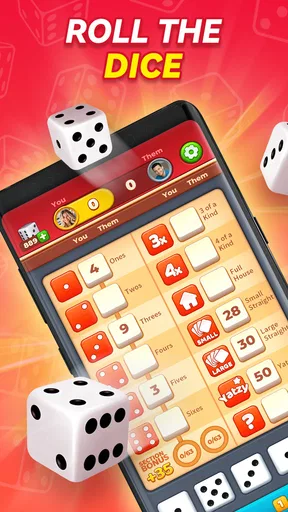
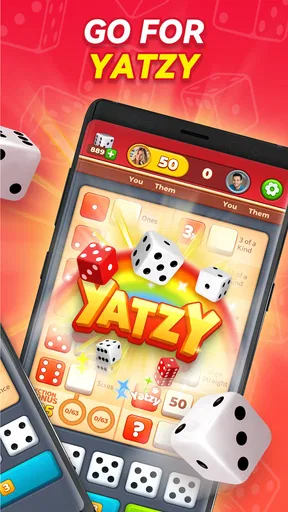
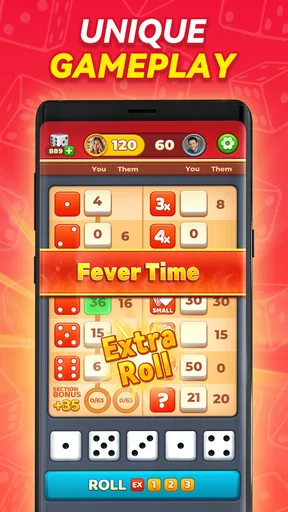
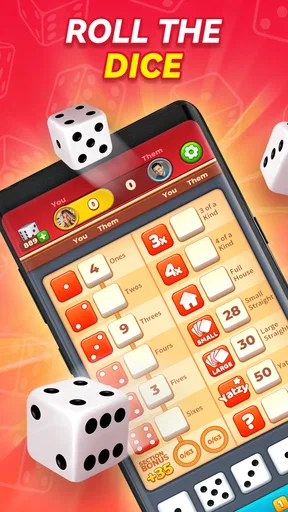
For those who aren’t familiar, Yatzy is a dice game where you roll five dice and score points based on the combinations you create, not unlike poker. Yatzy GO! stays true to the classic rules, which is great for Yatzy purists. But what I really loved was the variety of game modes. Whether you’re into solo play or want to challenge your friends, there’s something here for everyone.
- Solo Mode:
- Perfect for those times when you just want to chill and play at your own pace.
- Multiplayer:
- Challenge your friends or random players from around the world. The competitive spirit is real!
- Tournaments:
- Feeling lucky? Dive into tournaments and see how you stack up against the best.
The scoring system is straightforward, and the app does a great job of keeping track of everything for you. No more scribbling scores on a piece of paper—thank goodness!
Reading the scorecard instead of chasing every roll
A practical tip I use is to treat the scorecard as a set of choices, rather than judging a turn only by whether the dice look impressive. A modest score in a useful category can be better than repeatedly aiming for a rare combination and ending up with a wasted opportunity. The app handles the arithmetic, but it cannot make that trade-off for you; paying attention to which lines remain open is where the human part of the game lives.
This is also why digital Yatzy feels different from playing with physical dice and paper. In a face-to-face game, conversation and the ritual of passing the dice are part of the fun, and players can agree on house rules. Here, automatic scoring removes the chance of arithmetic slips and keeps a round moving, while the screen gives less room for that shared-table atmosphere. If your main goal is an evening of conversation, a physical set may be the better choice. If you want a tidy solo round or a quick match without preparing anything, the app has the advantage.
Graphics and Sound
Now, let’s talk about the aesthetics. While Yatzy isn’t exactly a graphics-heavy game, I appreciated the clean and crisp design of the app. The dice animations are smooth, and rolling them is oddly satisfying. The sound effects add a nice touch without being overwhelming. It’s just the right amount of audio feedback to keep you engaged without driving you nuts.
Small adjustments that make play more comfortable
When I’m playing somewhere public, I consider the sound before I start. The effects are part of the appeal, but audio that feels pleasant at home may not suit a quiet waiting room or a shared space. I’d use the phone’s own sound controls to keep the game unobtrusive, rather than assuming every session should be played aloud. That simple habit makes it easier to use the game as a short break without drawing attention or disturbing someone nearby.
The visual simplicity is similarly practical: the dice and score choices are the point, so a restrained presentation helps me focus on the turn. It does mean that players who want elaborate animation or a dramatic setting should temper their expectations. I see the look as a fit for a board game that depends on clarity, not as a substitute for the spectacle of a larger mobile game.
Features Worth Mentioning
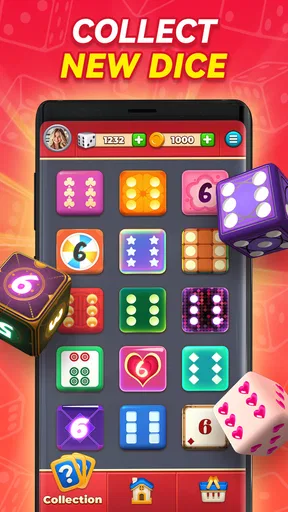
One of the standout features for me was the ability to customize my dice and backgrounds. It’s a small detail, but it adds a personal touch that makes the game feel more like mine. Plus, there are daily challenges and rewards that keep things fresh and exciting. It’s these little extras that keep me coming back for more.
The app also includes a handy tutorial for newbies. So if you’re new to Yatzy, don’t sweat it. You’ll be rolling like a pro in no time.
Getting more from challenges without turning them into chores
I’d treat a daily challenge as an optional nudge, not a reason to open the game when I don’t actually want to play. It can give a familiar ruleset a small goal, but the core enjoyment still comes from making decisions with the dice in front of you. If a challenge is not appealing that day, an ordinary round is still a complete way to enjoy the game. That keeps rewards from becoming the only reason to return.
Customization serves a different purpose: it lets the interface feel a little more personal, but it does not change the underlying luck-and-choice balance. I’d focus first on learning the score categories and only then spend attention on cosmetic options. For a beginner, understanding why one scoring choice is safer than another is more useful than changing the look of the dice; for a returning player, visual variety can be a pleasant extra rather than a new system to master.
What to know before spending or competing
The game is free to download, though it offers in-app purchases ranging from $0.99 to $99.99 per item. I’d go in treating purchases as optional rather than necessary to understand the game. If you prefer not to spend, it is sensible to check purchase prompts carefully and keep your device’s purchasing controls in mind, especially if someone else, such as a child, uses the phone. The presence of paid items does not by itself tell me that a purchase is needed for a satisfying session.
Its Everyone age rating makes the game broadly approachable, but I would still make purchase settings a household decision when children share a device. The social side also deserves a little common sense: the article describes chatting with opponents, so I’d use that feature only in a way that feels comfortable and keep personal details out of conversations with people I do not know. The option to compete can make a match livelier, but it is not a reason to treat every opponent or leaderboard position as important.
For anyone checking device compatibility, the listed minimum operating system is Android 7.0. The game is currently at version 3.4.6.1, and Game In Life is the developer. These practical details matter most if you are deciding whether an older phone can run it or want to identify the exact app before installing. The numbers are less important once you are playing, but it is useful to know what to look for when comparing it with other dice games.
How it sits among other board-game choices
Compared with a physical Yatzy set, this version is quicker to start and takes care of scoring, but it cannot reproduce the same face-to-face banter or flexible house rules. Compared with a basic digital dice-and-scorecard substitute, the modes and social elements described here offer more ways to play than simply tracking a round alone. That extra activity is welcome if you enjoy opponents, challenges, or rankings; if you want nothing beyond a quiet scorecard, a simpler alternative may be less distracting.
It also occupies a different space from board games built around long-term planning or a large collection of rules. Yatzy’s appeal is the compact cycle of roll, evaluate, and score. That makes it easier to fit into spare minutes, but means it may not satisfy someone seeking a rich campaign, a changing board, or a strategic contest with little reliance on chance. I’d choose it for quick decisions and replayable rounds, not as a replacement for every kind of board game.
Community and Connectivity
In the age of social gaming, Yatzy GO! doesn’t disappoint. The app’s social features allow you to connect with friends easily. You can even chat with opponents during games, which adds to the fun and interaction. Plus, the leaderboard is a nice touch for those with a competitive edge. Climbing those ranks feels pretty darn good!
Choosing the right way to play
If I’m introducing someone to the game, I’d begin with solo play so they can learn the scoring rhythm without feeling watched or rushed. Once the choices make sense, inviting a friend gives the same familiar rules a more social purpose. Tournaments and leaderboards suit players who like a visible competitive target, but they are not automatically the best way to learn: a ranking can make luck feel more personal than it is, especially after an unlucky round.
For a low-pressure visit with a friend, I’d use the social side to add conversation rather than turn every result into a test of skill. If I’m playing with strangers, I’d keep the match focused on the game and avoid sharing personal information. And if I simply want to unwind, solo play is the cleaner fit. The useful point is that the modes can serve different moods, so I wouldn’t judge the app only by whether I enjoy its most competitive option.
Final Thoughts
Overall, Yatzy GO! Classic Dice Game is a solid pick for anyone who loves dice games. It’s got just the right mix of nostalgia and modern features to keep both new players and seasoned Yatzy veterans entertained. Whether you’re looking to kill a few minutes or dive into a longer session, this app has you covered.
So, if you’re ready to roll the dice and see what luck has in store, give Yatzy GO! a try. You might just find yourself hooked!
My verdict, with the audience in mind
The appeal is reflected in its 4.9 average from around 20,000 ratings, with about 2,100 written reviews and over 500,000 installs. Those figures suggest it has found an audience, but they do not change the central question: do you enjoy a game where luck shapes the hand and your choices shape the score? If yes, this is an accessible way to play a familiar dice format, with solo, social, and competitive options to suit different moods.
I’d recommend it to casual board-game fans, people who want a compact game for spare moments, and anyone who enjoys comparing scores without learning a complicated system. I’d skip it if random outcomes routinely spoil a game for you, if you want a deep strategic challenge, or if you specifically want an in-person table experience. For my taste, the balance is strongest when I treat each round as a small decision puzzle rather than a serious test of expertise. It is free to start, broadly accessible, and easy to understand; the best reason to keep it installed is that a few rolls can make an ordinary pause feel pleasantly more involving.
Pros
- Intuitive interface for easy navigation.
- Variety of game modes to keep it fresh.
- Quick matchmaking for multiplayer games.
- Offline mode available for solo play.
- Sleek graphics enhance user experience.
Cons
- Occasional ads can interrupt gameplay.
- Limited customization for avatars.
- Requires internet for some features.
- In-app purchases can be pricey.
- No chat option in multiplayer mode.
FAQs for Yatzy GO! Classic Dice Game
What is Yatzy GO! Classic Dice Game?
Yatzy GO! Classic Dice Game is a mobile app that brings the classic dice game experience to your Android or iOS device. It offers a digital version of the popular game, allowing you to play solo or compete with friends online. The app features easy-to-use controls, vibrant graphics, and various modes to keep the gameplay engaging.
Is Yatzy GO! suitable for all ages?
Yes, Yatzy GO! is designed to be family-friendly and suitable for all ages. The game’s simple rules and user-friendly interface make it easy for children and adults alike to enjoy. However, it’s always recommended for parents to supervise younger children during gameplay to ensure an appropriate gaming experience.
Does Yatzy GO! offer multiplayer options?
Absolutely! Yatzy GO! includes both local and online multiplayer options. You can challenge your friends or family in real-time matches or join online games with players from around the world. The app’s multiplayer features ensure a dynamic and competitive gaming experience, perfect for those who love social gaming.
Are there in-app purchases in Yatzy GO!?
Yes, Yatzy GO! includes in-app purchases. While the base game is free to download, players can purchase additional features, themes, or game modes to enhance their experience. These purchases are optional, and the game can be enjoyed fully without spending money, but they can add extra excitement and customization.
What are the system requirements for Yatzy GO!?
Yatzy GO! is compatible with most modern Android and iOS devices. For Android, it typically requires version 5.0 or higher, while iOS devices should be running iOS 10.0 or later. It’s a lightweight app, so it doesn’t demand much storage space, ensuring smooth performance on both smartphones and tablets.


